
Building a Transparent Overlay That Doesn't Steal Focus with egui on Windows
This article is also available in 日本語.
Contents
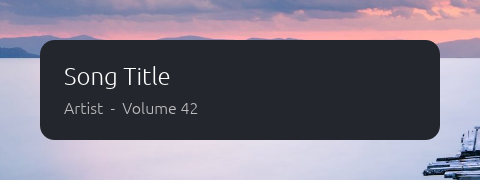
I built FlexFlyout, an app that shows the playing track when you press the volume keys, with Rust and egui (eframe). Its window has the same needs as the Windows volume indicator: everything outside the panel is see-through, it stays on top, it never takes the focus from the app you’re working in, and it shows up right away. eframe’s options alone weren’t enough for that, so here is what I filled in with direct Win32 calls.
What I needed, and how I got it
| Need | With eframe’s options alone | What I added |
|---|---|---|
| Everything outside the rounded panel is see-through | It’s black or white | Present through DirectComposition and paint the background with a black brush |
| No border or shadow | A 1-pixel white line along the top, plus a border and a faint shadow | Turn off winit’s shadow |
| Clicking doesn’t take the focus | After a while, it does | Guard the extended styles in a subclass |
| Shows up as soon as a volume key is pressed | Waits about 100 ms every time | Show it directly with Win32 from the other thread |
| A click on a button always works | A second click on the same pixel is dropped | Pass a move far outside when the pointer leaves |
| Can be dragged by its background | StartDrag does nothing | Start the same move loop as dragging a title bar |
Environment
- eframe, egui and egui-winit 0.37.0, winit 0.30.13, wgpu 30.0.1, windows crate 0.62
- A Windows 11 Enterprise evaluation 26H2 virtual machine (no GPU; DirectX 12 runs on the software renderer, WARP). Dragging was also checked on real hardware
- The screenshots and timings come from a small program cut down for this article (2026-11-12)
- The checks in the VM were run by Claude Code (how, in Japanese)
What eframe lets you set
First, set everything eframe offers.
let options = eframe::NativeOptions {
    viewport: egui::ViewportBuilder::default()
        .with_inner_size([420.0, 120.0])
        .with_decorations(false) // no frame
        .with_transparent(true)  // transparent
        .with_always_on_top()    // on top
        .with_taskbar(false)     // no taskbar button
        .with_active(false)      // not brought to the front when created
        .with_resizable(false),
    ..Default::default()
};App::clear_colorreturns[0.0; 4](fully transparent), and only the rounded panel is drawn- The Win32 settings below use the window handle (HWND) taken from eframe’s
CreationContext(throughHasWindowHandlefromraw-window-handle)
1. See-through outside the panel
With only the options above, the outside is black.
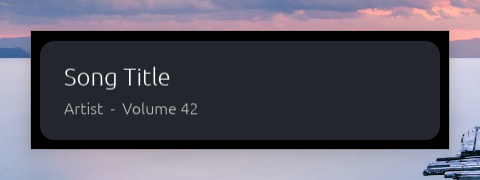
wgpu’s default DirectX 12 presentation (
Dx12SwapchainKind::DxgiFromHwnd) doesn’t support transparency- The comment in wgpu-types says so too: “This does not support transparency”
Switch to presenting through DirectComposition (
DxgiFromVisual). Set it with an environment variable before wgpu starts// At the top of main (before any other thread starts) // SAFETY: no other thread exists yet unsafe { std::env::set_var("WGPU_DX12_PRESENTATION_SYSTEM", "Visual") };- Now the outside is white
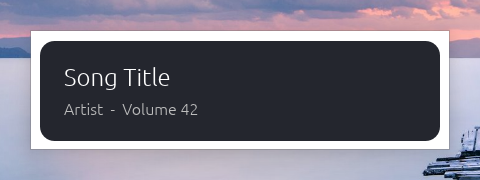
The white is the window’s own GDI surface (the redirection surface) left underneath
WS_EX_NOREDIRECTIONBITMAP, which stops that surface from being created, can only be given when the window is created. winit has an option for it (with_no_redirection_bitmap), but eframe offers no way to pass it
So paint the window class’s background black instead
// windows crate 0.62 SetClassLongPtrW(hwnd, GCLP_HBRBACKGROUND, GetStockObject(BLACK_BRUSH).0 as isize);- winit calls
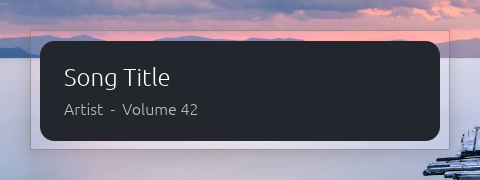
DwmEnableBlurBehindWindowon windows created as transparent (with an empty region, so nothing is blurred), and on such a window the black that GDI paints counts as transparent - Now the outside shows through. A gray border and a faint shadow remain, though
- winit calls
- This leans on an old mechanism. If you can create the window with winit directly,
with_no_redirection_bitmap(true)is probably the cleaner way (I haven’t tried it)
2. Remove the border, the shadow and the line along the top
- The gray border is the one Windows 11 draws around windows. Setting
DWMWA_BORDER_COLORtoDWMWA_COLOR_NONEwithDwmSetWindowAttributeremoves it - Even without the border, a 1-pixel white line along the top and a faint shadow remain
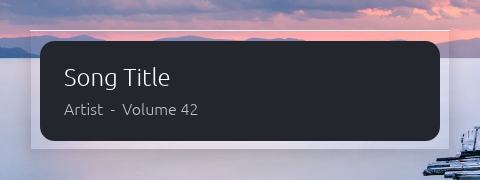
They come from winit’s shadow
- egui-winit always asks for a shadow on undecorated windows (
with_undecorated_shadow).ViewportBuildercan’t turn it off - To draw that shadow on Windows, winit keeps a 1-pixel strip of non-client area along the top of the window (winit’s source has a comment saying “This leads to a small black 1px border on the top”). That strip is the line
- egui-winit always asks for a shadow on undecorated windows (
Get the winit window, turn its shadow off, and have Windows recompute the frame
// Where the eframe App is created if let Some(window) = cc.winit_window() { use winit::platform::windows::WindowExtWindows as _; window.set_undecorated_shadow(false); } // Recompute the frame (without this, the strip stays) SetWindowPos(hwnd, None, 0, 0, 0, 0, SWP_NOMOVE | SWP_NOSIZE | SWP_NOZORDER | SWP_NOACTIVATE | SWP_FRAMECHANGED)?;- This needs
winitas a dependency (the same version as eframe’s;default-features = falseis enough) - The line, the shadow and the gray border all went away at once, giving the finished window at the top. Here, with the shadow off, the border color setting wasn’t needed (FlexFlyout sets both, just in case)
- This needs
All of the shadow goes, so this doesn’t fit an ordinary (opaque) undecorated window that should keep its shadow
3. Don’t take the focus
with_active(false)only keeps the window from coming to the front when it’s created. A click still takes the focus from the app in frontSo, after creating the window, I added the extended styles
WS_EX_NOACTIVATE(a click doesn’t activate it) andWS_EX_TOOLWINDOW(not in Alt+Tab), and removedWS_EX_APPWINDOW(forces a taskbar button), which winit setsThat works at first, but after a while, clicks take the focus again
- Whenever winit’s own state of the window (visibility, always-on-top and so on) changes, winit rewrites the whole style and extended style from its own values. Anything added from outside is lost each time
Subclass the window (
SetWindowSubclass) and put the styles back whenever they are rewrittenconst FLYOUT_EX_STYLE: WINDOW_EX_STYLE = WINDOW_EX_STYLE(WS_EX_NOACTIVATE.0 | WS_EX_TOOLWINDOW.0); // Installed with SetWindowSubclass(hwnd, Some(keep_flyout_styles), 1, 0), // in front of winit's window procedure unsafe extern "system" fn keep_flyout_styles( hwnd: HWND, message: u32, wparam: WPARAM, lparam: LPARAM, _id: usize, _data: usize, ) -> LRESULT { match message { // A click doesn't activate it (even while the styles are changing) WM_MOUSEACTIVATE => return LRESULT(MA_NOACTIVATE as isize), // Right before the extended style changes: add what's needed, // remove what isn't WM_STYLECHANGING if wparam.0 as i32 == GWL_EXSTYLE.0 => { let styles = unsafe { (lparam.0 as *mut STYLESTRUCT).as_mut() }; if let Some(styles) = styles { styles.styleNew = (styles.styleNew | FLYOUT_EX_STYLE.0) & !WS_EX_APPWINDOW.0; } } _ => {} } unsafe { DefSubclassProc(hwnd, message, wparam, lparam) } }- The first time, add the styles yourself with
SetWindowLongPtrW(hwnd, GWL_EXSTYLE, …)and apply them with the sameSetWindowPoswithSWP_FRAMECHANGEDas above - The fixes for clicks and dragging below go into this subclass too
- The first time, add the styles yourself with
4. Show it right away
The window stays hidden most of the time and should appear as soon as the volume changes (which another thread hears about)
The egui way is to send
ctx.send_viewport_cmd(ViewportCommand::Visible(true))from that thread and callrequest_repaint(). But it took about 100 ms every time to appear- eframe repaints windows that aren’t visible at most every 100 ms (
INVISIBLE_WINDOW_REPAINT_INTERVAL, the fix for hidden windows using up the CPU, egui#7776) Visible(true)is handled in the next frame, so it waits for that frame
- eframe repaints windows that aren’t visible at most every 100 ms (
I show the window directly with Win32 from the other thread. Once it’s visible, the throttling stops and eframe paints as usual
// HWND is a pointer and not Send, so it is passed to the thread as an isize sender.send(message)?; // send the content first unsafe { SetWindowPos(HWND(raw as *mut c_void), Some(HWND_TOPMOST), x, y, width, height, SWP_NOACTIVATE | SWP_SHOWWINDOW | SWP_ASYNCWINDOWPOS) }?; ctx.request_repaint(); // wake egui upSWP_ASYNCWINDOWPOSonly posts the request to the window’s thread and doesn’t wait. The caller isn’t held up even when the UI thread is busy- Hiding is done on the UI thread with
ShowWindow(hwnd, SW_HIDE). winit reads the visibility withIsWindowVisibleevery time, so showing and hiding from outside doesn’t confuse eframe
I timed 20 runs of each, from the request to the first frame drawn while visible
How it’s shown Min Average Max egui’s Visible(true)103.4 ms 104.1 ms 105.0 ms SetWindowPosfrom the other thread2.2 ms 2.9 ms 3.8 ms Two more things
- Before hiding, draw one fully transparent frame. Otherwise the previous picture flashes for a moment the next time the window appears
- Don’t keep calling
request_repaint()from drawing while hidden. A hidden window that asks for a repaint is still drawn every 100 ms, and asking again there keeps it drawing ten times a second while hidden (in FlexFlyout, 234 ms of CPU per 30 seconds while hidden went down to 0 ms)
5. Clicks and dragging
A second click on the same pixel is dropped
Click a button, move the pointer out of the window, come back to exactly the same pixel and click again: the click does nothing
- With a real mouse, it can show up now and then as “I clicked and nothing happened”
Two behaviors add up
- winit doesn’t forget the last position when the pointer leaves (
WM_MOUSELEAVE). When the pointer comes back to the same position, it doesn’t count as a move, so no move is reported - egui-winit forgets the position when the pointer leaves, and drops button presses that come while it has no position
- winit doesn’t forget the last position when the pointer leaves (
In the subclass, before passing
WM_MOUSELEAVEon to winit, pass aWM_MOUSEMOVEto a point far off the screen. winit’s last position changes, so the move is always reported when the pointer comes back// The windows crate has it only in the large Win32_UI_Controls feature const WM_MOUSELEAVE: u32 = 0x02A3; // Added to the match in keep_flyout_styles WM_MOUSELEAVE => { // (-32768, -32768): never inside the window let outside = (i16::MIN as u16 as u32) | ((i16::MIN as u16 as u32) << 16); unsafe { DefSubclassProc(hwnd, WM_MOUSEMOVE, WPARAM(0), LPARAM(outside as isize)) }; // The real WM_MOUSELEAVE is passed on to winit after this }
StartDrag does nothing
To let the window be dragged by its background, I sent egui’s
ctx.send_viewport_cmd(ViewportCommand::StartDrag). Nothing happened, and there was no error- egui-winit calls winit’s
drag_window()only when the window has the focus (a fix for a problem on X11, but the check applies on Windows too) - A window built never to take the focus never has it, so nothing happens
- egui-winit calls winit’s
Start the same move loop as dragging a title bar, yourself
let mut point = POINT::default(); unsafe { let _ = GetCursorPos(&mut point); let _ = ReleaseCapture(); let position = (point.x as i16 as u16 as u32) | ((point.y as i16 as u16 as u32) << 16); // Posted, so that it starts once this frame is drawn let _ = PostMessageW(Some(hwnd), WM_NCLBUTTONDOWN, WPARAM(HTCAPTION as usize), LPARAM(position as isize)); }- Windows’ move loop swallows the button release (
WM_LBUTTONUP). Left alone, egui keeps thinking the button is held - So, when the subclass gets the end of the move (
WM_EXITSIZEMOVE), it passes aWM_LBUTTONUPon to winit’s procedure (with the position in client coordinates) - The drag doesn’t start over buttons or bars, and only after the pointer has moved a little with the button down
- Windows’ move loop swallows the button release (
Summary
- egui draws and handles input; Win32 only fills in the window’s attributes and the timing of showing it. Each gap comes from how winit and egui-winit work
- This is about the current versions (eframe 0.37, winit 0.30). When I upgrade, I plan to take these workarounds out and check whether they’re still needed
- FlexFlyout’s implementation is in window.rs