
I Built nubmiddle: TrackPoint Middle Click and Scroll Together on Windows
This article is also available in 日本語.
Contents
This is a sequel, nine years late (I counted), to an article I wrote in Japanese in 2017 about making the ThinkPad TrackPoint’s middle button comfortable on Windows. I built nubmiddle, a Windows tool that does just one thing: it lets the TrackPoint’s middle button both middle-click and scroll. It’s now on the Microsoft Store.
- Microsoft Store: https://apps.microsoft.com/detail/9NNH2W7M8MGP
- GitHub: https://github.com/akivajp/nubmiddle
It does only two things:
- Click the middle button → a normal middle click (close a tab, open a link in a new tab, and so on)
- Hold the middle button and push the stick → scroll vertically or horizontally
About the name: “nub” is what ThinkPad fans call the TrackPoint. (In Japan we call it aka-pocchi, roughly “the little red dot”.) It’s a tool for the nub’s middle button, hence nubmiddle.
The story so far
- In 2017, I wrote the article above
- Lenovo’s official driver makes you choose between “middle-button scrolling” and “middle click”; you can’t have both (even though Linux gives you both out of the box)
- The fix back then was a small background tool called TPMiddle
- In 2019, I added a note saying I had moved to W10Wheel.NET
- From then until I built nubmiddle, I relied on W10Wheel.NET the whole time
- I kept the downloaded exe in OneDrive, and on every fresh OS setup I wrote a Task Scheduler entry to start it elevated at logon
- Unless it runs as administrator, the middle button doesn’t work over windows running as administrator (an elevated terminal, for example)
- That was about all the effort it took. Not really something to complain about
- But even updating it felt like a chore, so I stubbornly stayed on the same version while new ones came out
- Security issues or memory leaks might have been fixed in them, for all I knew. That never felt healthy
- And it’s a tool full of features for trackballs and multi-button mice, of which I used exactly one
- I kept the downloaded exe in OneDrive, and on every fresh OS setup I wrote a Task Scheduler entry to start it elevated at logon
- Going back to TPMiddle isn’t an option either
- It relies on the Synaptics driver API, and it’s reported not to work on models whose TrackPoint is made by ELAN (the X390 and later, apparently)
Why I built it
What I want has never changed
- Middle click and scroll together, and nothing else
- Install it and be done. It looks after its own autostart and updates
- Not tied to the TrackPoint’s vendor or model
I looked around again, and found nothing that ticks every box
Option Where it fell short for me TPMiddle Depends on the Synaptics API. Reported not to work on ELAN TrackPoints. No longer updated W10Wheel.NET Works. But it’s a feature-rich wheel simulator, and starting it elevated at logon is a manual setup X-Mouse Button Control / AutoHotkey Can be configured to do it. But they are general-purpose tools, and you write the configuration yourself - None of these are bad tools. They were just bigger than my “this is all I need”
And before I ever found it, the age of AI-driven development arrived
- A tool like this has to call low-level OS APIs (mouse hooks, Task Scheduler registration and so on). Without the know-how, I expected it to be hard to implement on my own
- But rigtop and FlexFlyout, which I also started because “there are existing tools, but something small bothers me”, came together surprisingly easily once I left most of the implementation to Claude Code
- Next to those, nubmiddle is minimal. “I could build this one too”, I thought, so I did (that really is the whole reason)
- (That’s as of today. These tools change every few months, so by next year even the way of building may be different)
I chose Rust
- It gives one small exe with no runtime to install (back in the TPMiddle days, step one was installing the Visual C++ runtime…)
- An ARM64 build comes just as easily
- The tool stays resident and may run elevated, so I wanted a memory-safe language
What it does
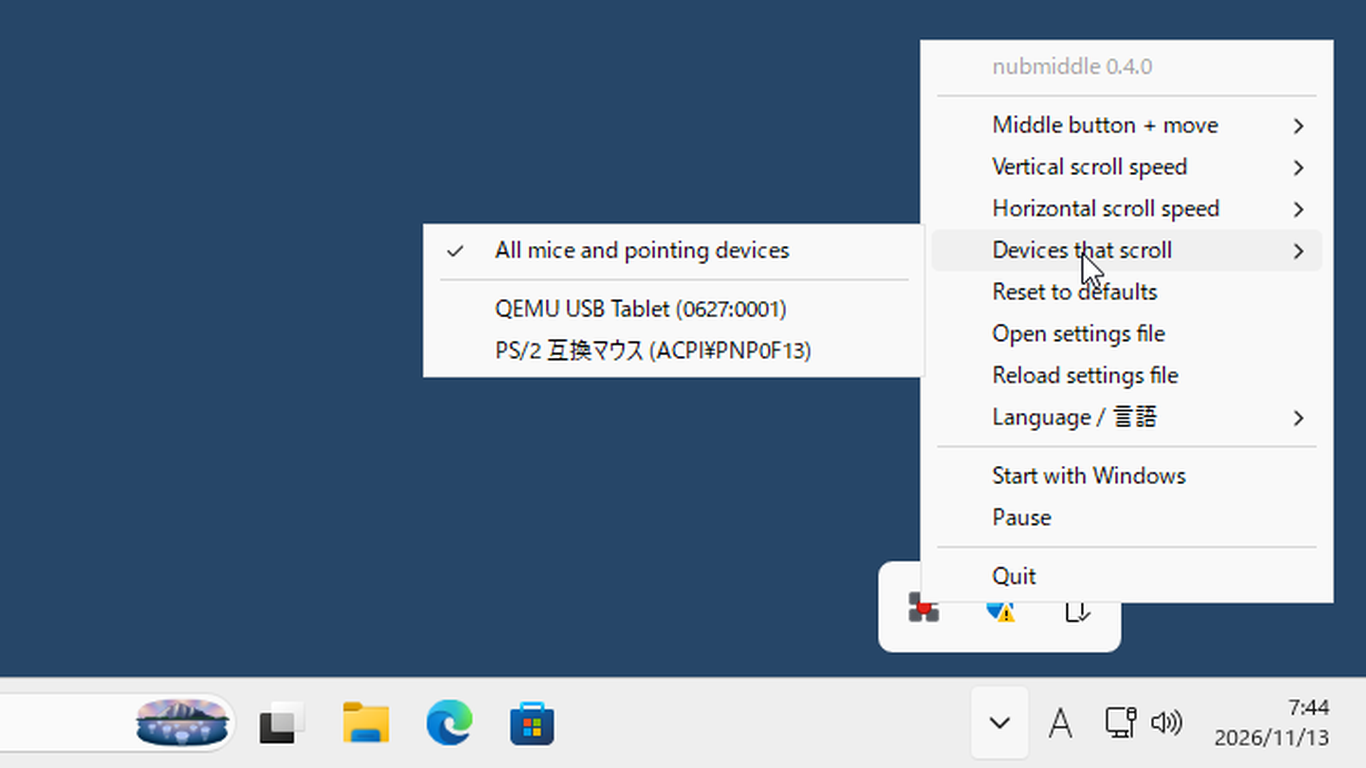
- It lives in the notification area (system tray). Every setting is in the icon’s menu
- While scrolling, the pointer stays where it is and turns into an arrow showing the scroll direction
- Scrolling is locked to the axis you started along. If your finger drifts sideways a little while scrolling down, the page doesn’t slide sideways
- Five speed steps each for vertical and horizontal scrolling
- You choose which devices scroll
- The TrackPoint can scroll while an ordinary mouse keeps its normal middle button
- That’s for people who don’t want to lose middle-button drag (panning) in Blender or CAD
- There is also a mode that passes a plain middle-button drag through instead of scrolling
- Start with Windows (just tick a menu item)
- English and Japanese
- No data collection, no network access
- Free and open source (MIT)
Trying it
Installing
- Microsoft Store (recommended): https://apps.microsoft.com/detail/9NNH2W7M8MGP
- The Store signs it, so there’s no SmartScreen warning, and the Store delivers updates (no more stubbornly staying on an old version)
- It’s for Windows 11
- One limitation: the Store version can’t run elevated, so it can’t scroll windows running as administrator (see “Elevated windows” below)
- Installer / zip: from GitHub Releases
x64for most PCs,arm64for Windows on ARM- They aren’t code-signed yet, so SmartScreen may warn on first start (“More info” → “Run anyway”)
- The zip just needs unpacking anywhere and running
nubmiddle.exe. Put an emptynubmiddle.ininext to it and the settings are saved there too (so you can keep it in OneDrive and share it between PCs)
Set the driver to “middle click”
- My 2017 article told you to choose “use for scrolling”. This time it’s the opposite
- In the Lenovo (Synaptics / ELAN) driver settings, set the middle button to “middle click”, not “scroll”
- Left on “scroll”, the driver may turn the middle button into wheel events itself, and nubmiddle never sees the button
- nubmiddle works on the mouse events that reach Windows. It doesn’t use any driver API, so it doesn’t depend on the vendor
Start it and try
- When it starts, an icon appears in the notification area, with a notification pointing at it
- Try it in a browser
- Middle-click a tab → it closes
- Hold the middle button over a page and push the stick → it scrolls
- Both work. Well done!
- Then tick “Start with Windows” in the menu, and setup is finished
- No more opening the
shell:startupfolder and making a shortcut, as in the old article
- No more opening the
Elevated windows
- Because of how Windows works (UIPI), a program running with normal rights can’t send input to a window running as administrator
- So over an elevated terminal and the like, nubmiddle can only scroll if it runs as administrator itself
- Installer / zip: tick “Start with Windows (as administrator)” in the menu, and it registers a Task Scheduler task that starts nubmiddle elevated at logon
- You get one UAC prompt when you tick it, and none at logon
- If you move the exe, it notices on start and registers itself again
- Store version: it can’t be elevated, so it can’t scroll elevated windows
- If you live in elevated terminals, take the installer version
What was hard
- The mechanism is simple
- A low-level mouse hook swallows the middle-button press and holds on to it
- If the stick moves while the button is held, it swallows the movement (so the pointer stays put) and sends it on as wheel input
- If the button is released without moving, it replays the held press and release as a middle click
- …or so I thought. In real use, a few things got in the way. Just a taste:
- Scrolling shakes violently in the Windows Settings app: even when you mean to scroll straight down, a little sideways input gets mixed in. When vertical and horizontal wheel events arrive alternately, the Settings app’s position jumps back and forth. Locking the scroll to the axis it started along fixed it
- While an elevated window is in the foreground, the hook isn’t even called: it’s not only that input can’t be sent. The mouse events stop arriving, so the pointer moves along too. The only way is to run elevated
- The hook can’t tell which device the middle button belongs to: telling devices apart takes a second mechanism, Raw Input. But which of the two arrives first isn’t fixed (for the button press Raw Input came first, for movement the hook did). nubmiddle decides correctly in either order
- The Microsoft Store rejected it once: my screenshots showed a browser being scrolled, and the review said the app itself wasn’t in them. Probably a classic for tray tools. I retook them with the tray menu, and it passed
How I checked it while building it
- I left most of the implementation to Claude Code. My part was deciding the requirements, making the calls (the name, the defaults, whether to go on the Store) and testing on real hardware
- With this kind of tool, a lot only shows when you actually use it
- Both the shaking in the Settings app and the pointer moving over elevated windows were things I noticed with an external TrackPoint keyboard under my fingers
- I’d report what I saw → Claude Code would build a version with more logging → I’d try again and hand over the log → the cause would turn up and get fixed
- The Store version (install, start, menu, autostart) was checked by Claude Code itself, running it in a Windows 11 virtual machine
- Even “hold the middle button and move” could be sent to the VM’s mouse from outside
Tested environments, and reports wanted
- Tested (nubmiddle v0.4.0)
- Windows 11
- ThinkPad USB Keyboard with TrackPoint (SK-8855, wired)
- ThinkPad TrackPoint Keyboard II (Bluetooth / USB receiver)
- Not tested yet
- The built-in TrackPoint of a ThinkPad (Synaptics / ELAN): it should work by design, but I haven’t confirmed it (the reason is at the end)
- Sticks other than ThinkPad’s, such as the HHKB Studio: they should work if the middle button reaches Windows as an ordinary middle button
- Reports of it working or not working are welcome on GitHub Issues
- If it misbehaves, start it with
nubmiddle --trace --log trace.logand the middle-button and wheel events go to the log. Attaching that helps a lot
- If it misbehaves, start it with
Closing
It seems people still read that nine-year-old article (thank you). I hope those of you with the same problem can now just install it from the Store and tick one box.
…And so far I’ve been writing as if I spoke for ThinkPad users everywhere. But honestly? My beloved ThinkPad T14s Gen 4 (AMD) runs CachyOS, and so comfortably that I still haven’t tested nubmiddle on Windows on an actual ThinkPad! (As I wrote in the old article, “put Ubuntu on a ThinkPad and it’s comfortable from the start”: on Linux, middle click and scrolling just work together…)
So if you run Windows on a ThinkPad itself, I’d love to hear how it goes.