I Built rigtop, an Even More All-in-One System Monitor
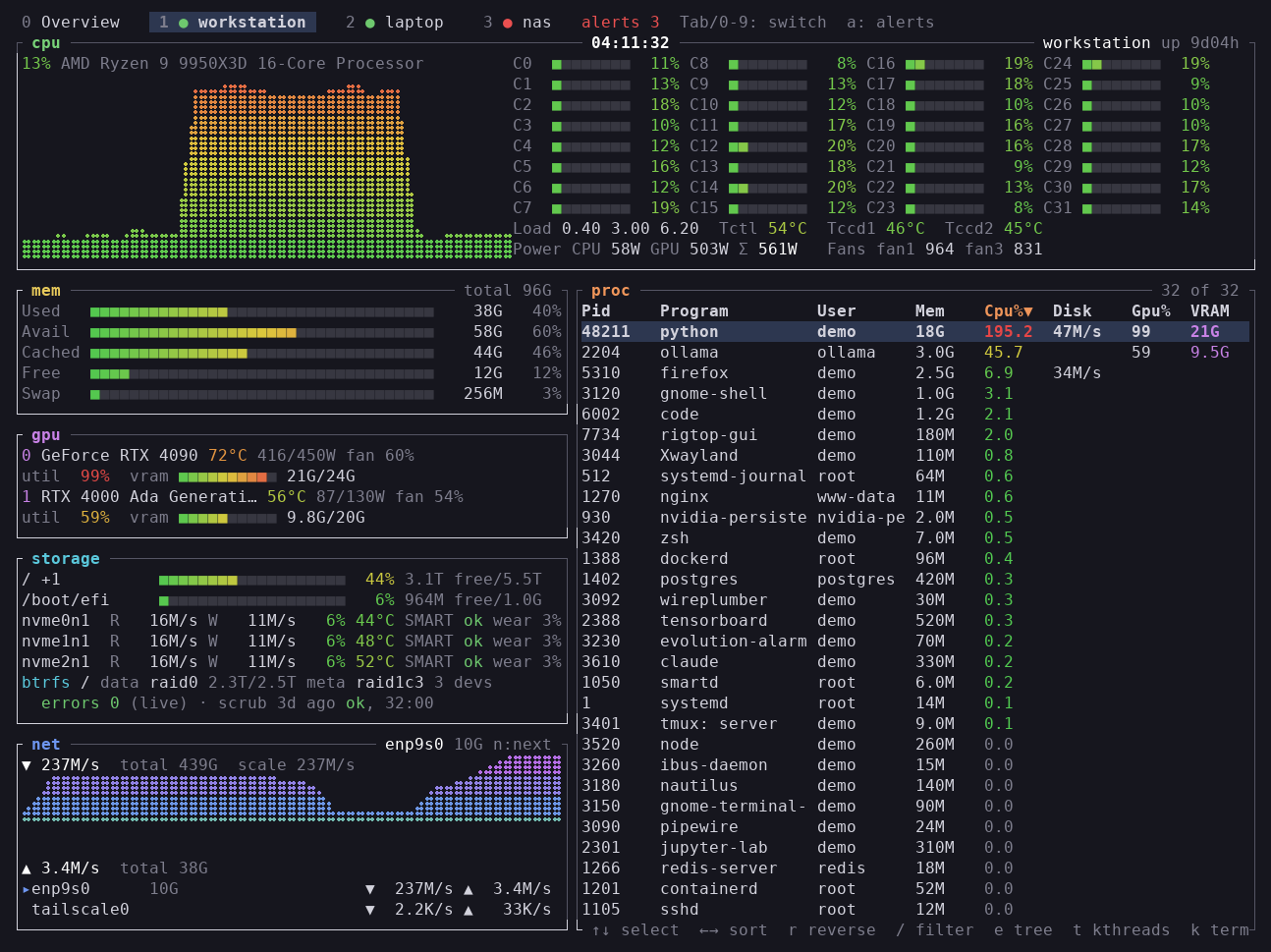
I built rigtop (pronounced “rig-top”), a btop-like system monitor.
It comes as a terminal UI (rigtop) and a native GUI (rigtop-gui), and so far it has been tested on Linux, Windows and macOS (Apple Silicon).
- GitHub: https://github.com/akivajp/rigtop
- crates.io: https://crates.io/crates/rigtop
Why I built it
- I use btop every day. Opening btop over
sshfrom my Windows desktop on my Linux servers (a GPU workstation and a NAS) is part of my daily routine - I love how it puts everything on one screen, but over time I found a few things I wanted for the way I use it
- Storage health: I run RAID with btrfs and mdadm, so I want per-device error counts, RAID degradation, SMART and NVMe temperatures right next to everything else
- Which process is using GPU memory: when machine learning jobs run on several GPUs, this is what I want to know most
- One terminal per host: I want several hosts side by side, with the ones that need attention standing out
- Outside the terminal, too: panels that grow with the window, and longer history
- I looked around at existing tools first. GUI monitors such as Mission Center look great, but none of them packs as much onto one screen as btop, and none of them can watch remote hosts
- So I listed what I wanted as requirements and built it myself. I also used AI coding assistance during development
What it does
- Like btop, it shows the CPU (total, per core, temperatures), every GPU, memory, storage, network and the process list on one screen. You can terminate or kill processes, too
- On top of that, it adds what I was missing
- Storage: btrfs RAID profiles and per-device error counts, mdadm status, SMART, NVMe temperatures
- GPU: per-process VRAM and GPU utilization (NVIDIA). AMD and Intel GPUs are shown as well
- Power and fans: total CPU + GPU power draw, and fan speeds (you can name each fan)
- Multiple hosts: watch any number of hosts over SSH, side by side
- Widgets: a clock, or the output of any command, in a column on the right
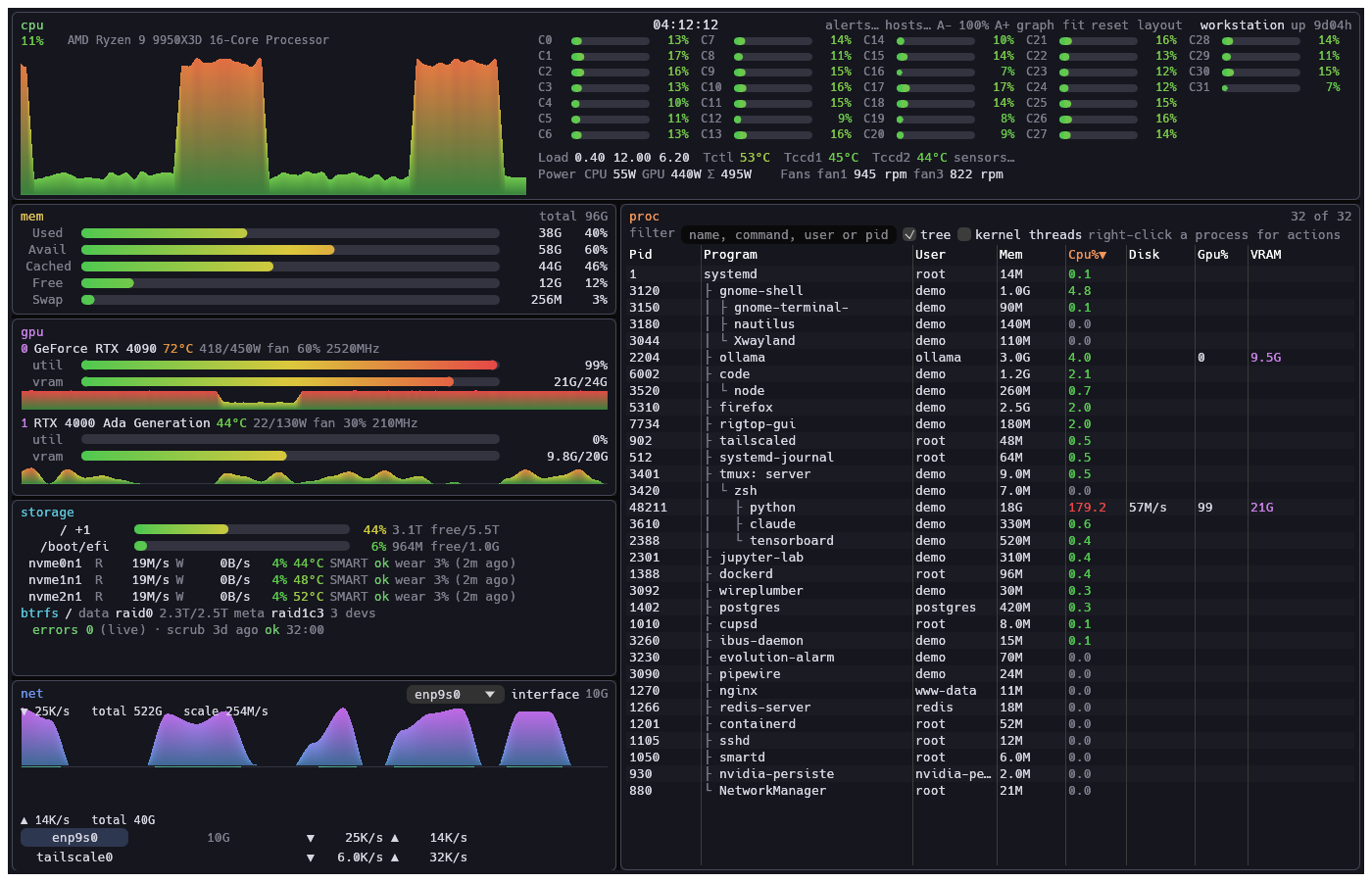
- The GUI keeps btop’s layout, and you can resize and rearrange the panels by dragging
Trying it out
Installing
- On Linux and macOS (Apple Silicon), a one-liner installs it. It goes to
~/.local/bin, so nosudois needed, and running it again updates to the latest release
$ curl -fsSL https://github.com/akivajp/rigtop/releases/latest/download/install.sh | sh
- Or download an archive from Releases, extract it, and put the binaries somewhere on your
PATH - There are a few other ways, too
$ cargo install rigtop rigtop-gui           # if you have Rust
$ sudo apt install ./rigtop_*_amd64.deb      # Debian / Ubuntu 22.04 or later (the .deb from Releases)
# Windows (Scoop)
> scoop install https://raw.githubusercontent.com/akivajp/rigtop/main/packaging/scoop/rigtop.json
- Packaging for package managers still has a long way to go. It is not in an apt repository, winget or Homebrew yet, and since new AUR account registrations are paused, Arch users build it from the PKGBUILD in the repository for now
Running
$ rigtop          # terminal UI
$ rigtop-gui      # GUI
$ rigtop --demo   # try it out with made-up data for three hosts
- Almost everything works without extra software or root
- Only SMART needs root, so a root systemd timer collects it every 10 minutes into files that rigtop reads (
sudo "$(command -v rigtop)" --install-collectorsets it up). rigtop itself never runs as root, and it does not loosen device permissions
Watching multiple hosts
# ~/.config/rigtop/config.toml
[[hosts]]
name = "workstation"

[[hosts]]
name = "nas"
ssh = "admin@nas.local"
- With rigtop installed on the monitored hosts too, your local rigtop starts
ssh <host> rigtop --agentand receives the readings over standard input and output- No daemon and no open ports. SSH handles authentication and encryption, so your
~/.ssh/config, keys andProxyJumpwork as usual
- No daemon and no open ports. SSH handles authentication and encryption, so your
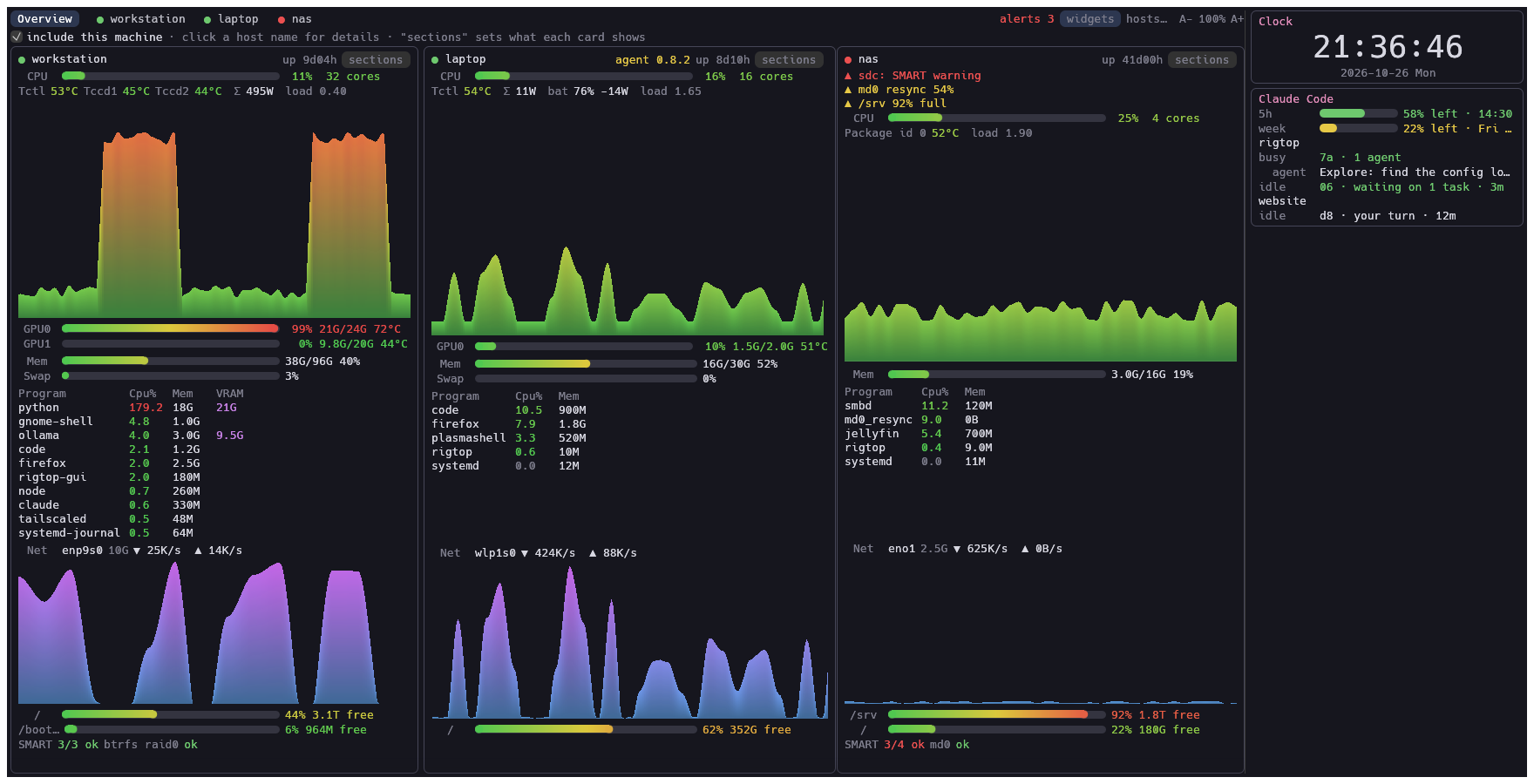
- With two or more hosts, rigtop starts with an overview of all of them, and tabs switch to each host’s details
- Items that need attention, such as storage errors or high temperatures, come first on each card. The GUI also sends desktop notifications for new alerts (Linux)
Adding widgets
- You can put whatever you want to keep an eye on in a column on the right (the right edge of the screenshot above)
- A widget is either the built-in clock or any command. rigtop runs the command every few seconds and shows its output: plain text, or JSON in a simple format (labels, values, gauges and colors)
[[widgets]]
name = "Clock"
builtin = "clock"

[[widgets]]
name = "Claude Code"
command = "/path/to/rigtop/contrib/widgets/claude-code/claude-code-widget"
- So far, I have made and use these two
- A big clock: modest, but having a clock on a monitoring screen that is always open turns out to be handy
- Claude Code status: how much of the usage limits (5-hour and weekly) is left and when they reset, the running sessions and subagents, and whether an idle session is waiting on background work or waiting for me
- While Claude Code works on things for me, I can see at a glance which session is waiting for my reply, and I have come to like this one a lot
- It is in the repository under
contrib/widgets/claude-code/(the usage limits need a Pro or Max plan and Claude Code’s status line setting)
Windows
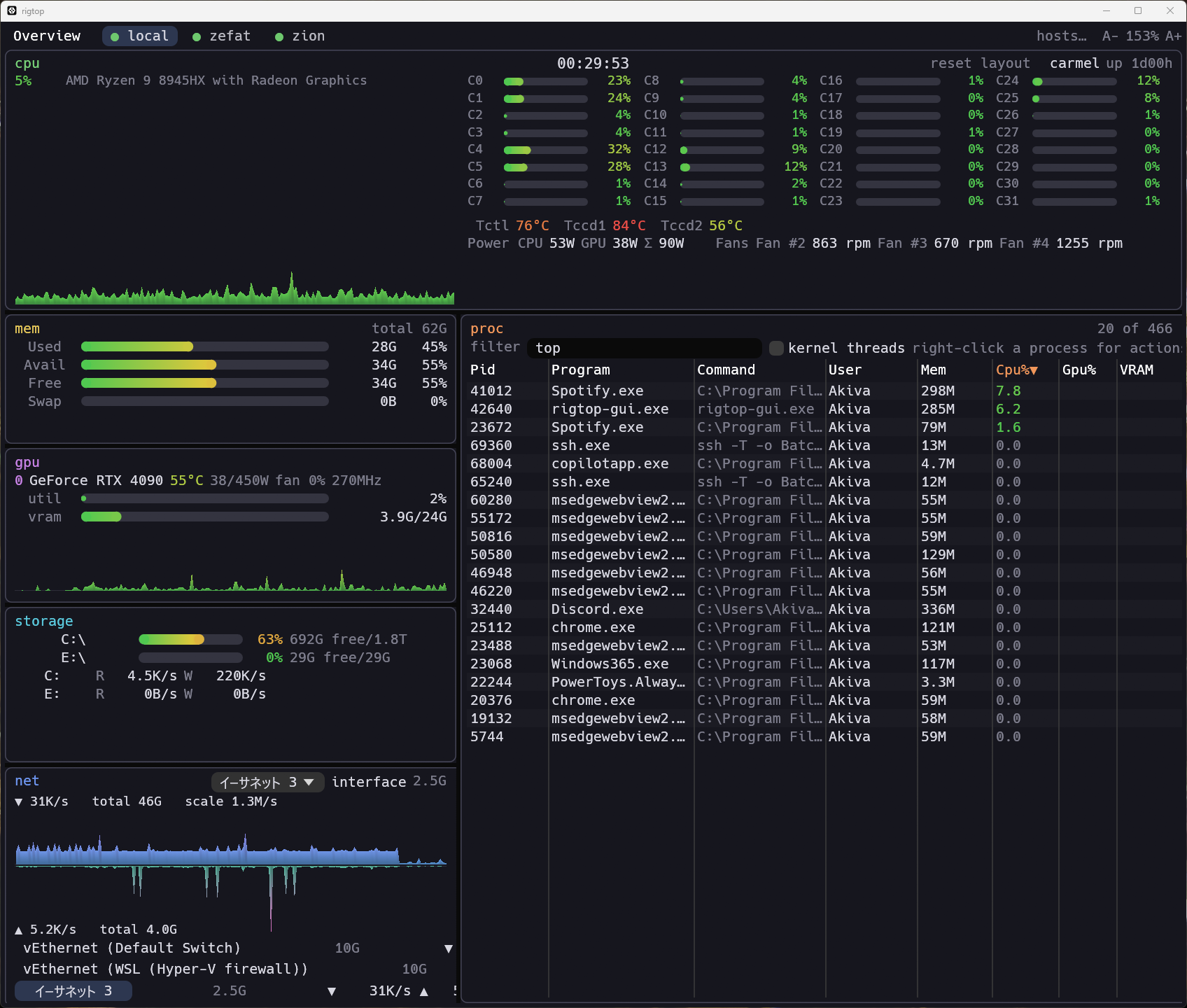
- CPU, memory, processes, network, drives and NVIDIA GPUs work out of the box
- Windows cannot read temperatures, fans, CPU power or drive health on its own, so rigtop reads them from LibreHardwareMonitor
- The GUI’s “set up…” button installs and configures it for you
Looking for help
So far, it runs smoothly on these machines of mine (rigtop v0.10.0).
- Ubuntu 26.04 (Ryzen 9 9950X3D, RTX 4090 + RTX 4000 Ada, btrfs RAID on three NVMe drives)
- CachyOS (a laptop with a Ryzen 7 PRO 7840U)
- Windows (Ryzen 9 8945HX + RTX 4090, with LibreHardwareMonitor)
But there is a lot I cannot check on my own.
macOS users: a user checked it on Apple Silicon hardware and reported a memory display bug, now fixed (v0.11.0). I don’t own a Mac myself, so sensors such as temperatures are still unchecked (and the binaries are not signed). Anything you notice helps
Issues: missing sensors, odd names, broken layouts, anything is welcome. For sensor problems, the output of
rigtop --dump-json --prettymakes it much easier to track down the cause (it includes host and process names, so mask anything you’d rather not share)Contributors: it is written in Rust. Help with packaging (AUR, winget, Homebrew, Nix and so on) is very welcome too
P.S.
- Yasu-umi tested rigtop on macOS and reported and fixed bugs there. Thank you!
- ゆん茶 (@hbryg5), who covers AI news in manga form, introduced rigtop in a manga (in Japanese). Thank you!